Skip to content
TTinyStack

TinyStack · Chrome extensions

Lightweight, privacy-first Chrome extensions for everyday workflows.

Three small extensions that each do one job properly: pull a web table into a clean file, audit a YouTube video without the noise, or read what a Shopify store is built with. Everything you point them at is processed inside your own browser.

Free tier on every extension · Pro at $9/month or $29/year per extension · Support at zinbklove@gmail.com

The three extensions

Each one is installed on its own, licensed on its own, and does not need the others to work.

TableCrate

Includes a 7-day free trial of Pro

Web tables to clean CSV, Excel, TSV, JSON or Markdown in one click.

Point TableCrate at a table or a repeating list on the page you are already looking at, check the preview, and export it in the format you actually need. It converts everything on your device and writes the file straight to your downloads folder.

  • Live preview of the first rows before you commit to an export
  • CSV with a UTF-8 BOM, so Korean, Japanese and accented text opens correctly in Excel
  • Real .xlsx with a frozen header row, plus TSV for Google Sheets, JSON and Markdown
  • Collect tables that span several pages through the page’s own Next button
  • Saved recipes for the sites you export from again and again

Free · $0

Detect and export the current page, up to 100 rows per export, 10 exports a day, in every format.

Pro · $9/mo or $29/yr

Unlimited rows and exports, multi-page collection and saved recipes.

Secure checkout on creem.io. Both plans include a 7-day free trial.

Good to know: Tables drawn inside canvas or shadow-DOM widgets may need the element picker, and infinite-scroll pages are collected through their Next button rather than by auto-scrolling.
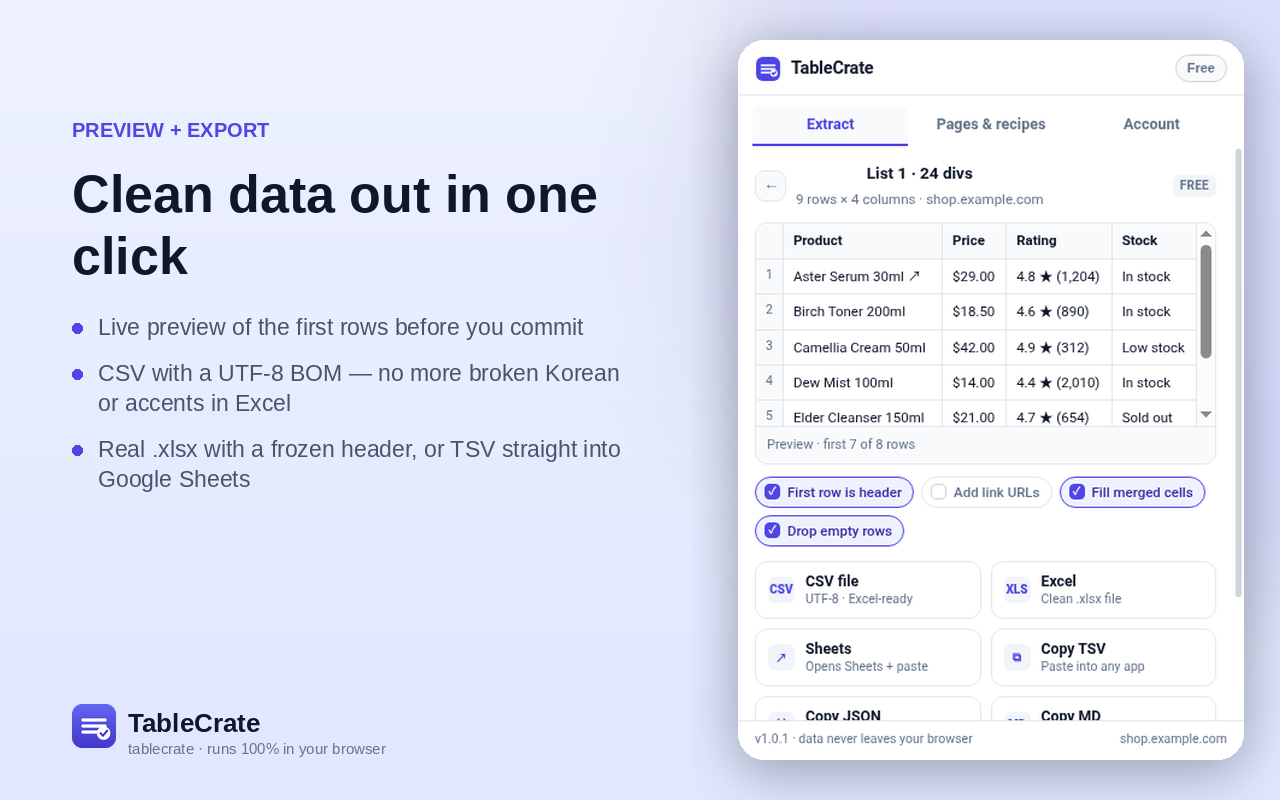
TableCrate popup showing a live preview of a product table with format buttons for CSV, Excel, Sheets, TSV, JSON and Markdown.
TableCrate — an actual screenshot of the extension, not a mockup.

TubeGlean

A quiet YouTube SEO and tag audit, right on the page you are on.

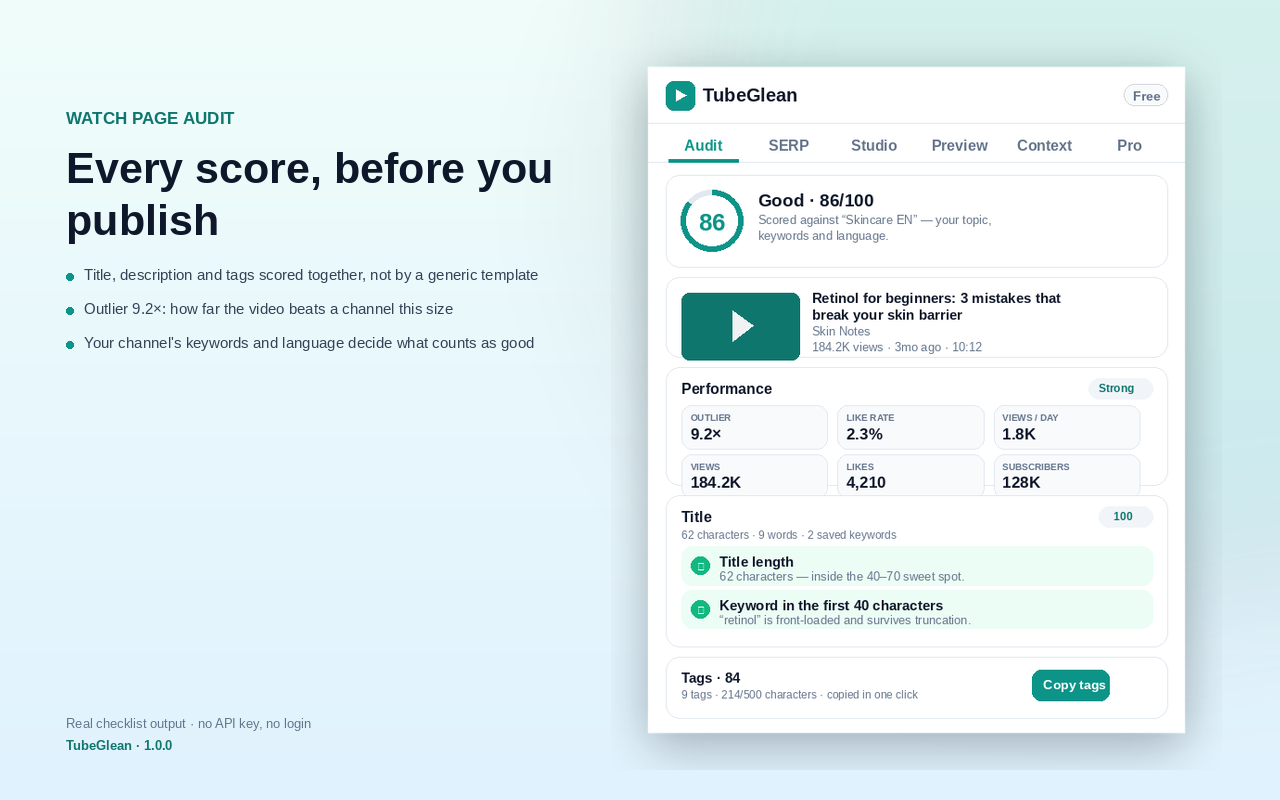
TubeGlean scores title, description and tags together against the topic of the video you are watching, on Watch, Search and Studio pages. It reads results as a table and shows what a video is competing with, without popups or an upsell in the middle of your edit.

  • Title, description and tags scored together, not against a generic template
  • Outlier multiple that shows how far a video beats other videos of its size
  • Search results read as a sortable table, with the tags of every result
  • Studio draft scoring before you publish, and a feed preview for the final thumbnail and title
  • Hidden tags of any video, copied in one click

Free · $0

Unlimited video audits, hidden tags, the full checklist, 10 search summaries a day and 1 channel preset.

Pro · $9/mo or $29/yr

Unlimited search analysis, CSV export, one preset per channel and A/B thumbnail preview.

Secure checkout on creem.io. Both plans include a 7-day free trial.

TubeGlean sidebar on a YouTube watch page showing a 86/100 checklist score, performance figures and a tag breakdown.
TubeGlean — an actual screenshot of the extension, not a mockup.

StoreCrate

Shopify store intel where every line shows the field it came from.

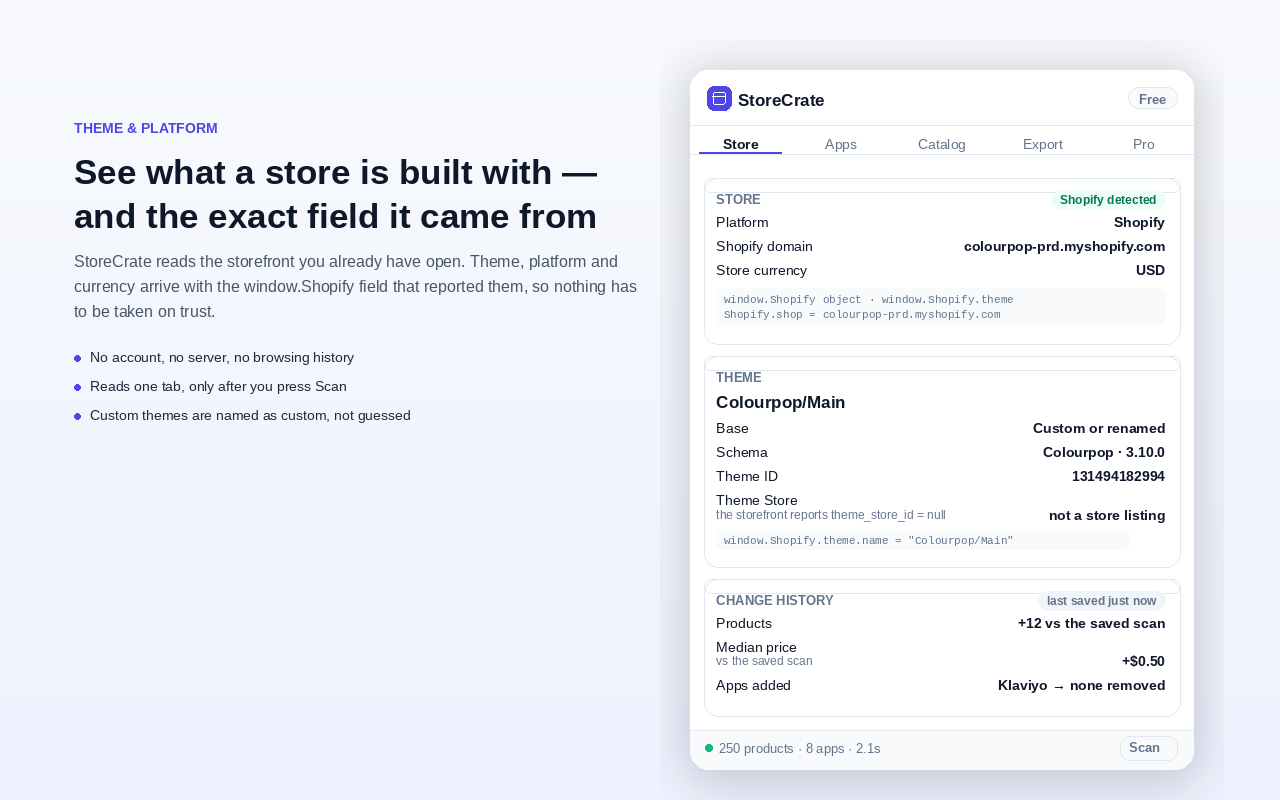
Open a Shopify storefront and StoreCrate reads the platform, the theme, the apps and pixels it can see in the page, plus the public catalog. Each finding is printed with its evidence, so you can check it instead of trusting a score.

  • Theme and app stack detection, with the window.Shopify field behind each line
  • Catalog pricing distribution across the products the storefront publishes
  • Change history for a saved scan: theme changes, apps added or removed, price moves
  • Export the catalog as CSV, JSON or Markdown
  • Custom themes are reported as custom, not guessed into a name

Free · $0

Theme, apps and pixels with evidence, the first 250 products, and one CSV export a day of up to 50 product rows.

Pro · $9/mo or $29/yr

Up to 2,500 products per scan, whole-catalog CSV and JSON, best sellers, and saved scans with a change list.

Secure checkout on creem.io. Both plans include a 7-day free trial.

Good to know: It reads the public storefront only. Revenue, sales volume and private analytics are never estimated.

StoreCrate popup listing a Shopify store’s platform, theme name and base, apps and a change history against a saved scan.
StoreCrate — an actual screenshot of the extension, not a mockup.

Nothing you look at leaves your browser

That is the whole design of the suite, not a setting you have to find. If an extension cannot work without uploading the page, it does not get shipped.

One tab, on your click

Access is requested with activeTab when you press the icon, and ends when that tab is closed or reloaded. No background reading of pages.

No account, no analytics

No sign-up, no tracking pixels, no crash reporting, no advertising identifier. Settings and licence state live in chrome.storage.local on your device.

One network request

Activate a Pro key and the extension asks our licence endpoint on stackswitch.dev, which checks it with Creem, our licensing and payment provider. That request carries the key and nothing else: no page content, no URLs, no history.

You keep the output

Exports are written straight to your own downloads folder. Nothing passes through a server of ours, because there is no server of ours holding your files.

Read the full Privacy Policy →

Pricing

Every extension is free to install. Pro is sold per extension, so you only pay for the ones you use.

Free

$0forever

Core local features in all three extensions.

  • Install any extension and use its core features
  • No account, no card, no trial countdown
  • Every format the free tier allows
  • Same local-only processing as Pro

Pro

$9per month, or $29 per year

One Pro licence per extension — you only pay for the ones you use.

  • Everything in Free, without the daily limits
  • Unlimited rows, exports, search analysis or catalog depth, depending on the extension
  • A 7-day free trial of Pro in every extension, no card needed
  • Cancel any time; Pro runs to the end of the paid period
ExtensionFreePro
TableCrateDetect and export the current page, up to 100 rows per export, 10 exports a day, in every format.Unlimited rows and exports, multi-page collection and saved recipes.$9/mo · $29/yrBuy monthlyBuy yearly
TubeGleanUnlimited video audits, hidden tags, the full checklist, 10 search summaries a day and 1 channel preset.Unlimited search analysis, CSV export, one preset per channel and A/B thumbnail preview.$9/mo · $29/yrBuy monthlyBuy yearly
StoreCrateTheme, apps and pixels with evidence, the first 250 products, and one CSV export a day of up to 50 product rows.Up to 2,500 products per scan, whole-catalog CSV and JSON, best sellers, and saved scans with a change list.$9/mo · $29/yrBuy monthlyBuy yearly

Prices are in US dollars and are the same on every plan. Each subscription covers one extension; buying Pro for two extensions means two subscriptions, and you can cancel either one on its own.

Pro payments are processed by Creem (creem.io) as the merchant of record. Creem takes the payment, calculates and collects any sales tax or VAT due on your billing address, and issues the invoice. Creem is the legal seller of the licence; we build, deliver and support the software.

Each Pro plan also starts with a 7-day free trial: Creem asks for a card when the trial starts and charges the first payment only after the trial ends. The licence key for the plan you buy arrives by email and in the Creem customer portal.

The extensions themselves are in final Chrome Web Store review. A Pro licence you buy now is valid from the moment the matching listing goes live; if you would rather not wait, email zinbklove@gmail.com and we will refund or cancel it.

Questions

Do I need an account to use the extensions?

No. There is no sign-up, no login and no profile. You install the extension, click it on a page, and it works. The free tier never asks for a card.

Where is my data processed?

In your own browser. The page you point an extension at is read only after you click its toolbar icon on that tab, and the result is built locally. Page content is never uploaded to us or to anyone else. The single exception is the licence check that runs when you activate or re-validate a Pro key.

Who handles the payment, and what do you see?

Creem (creem.io) is the merchant of record for every Pro purchase. Creem takes the card details, calculates and collects any sales tax or VAT that applies to your billing address, and issues the invoice. We receive the order confirmation and the licence, and we never see your card number. Questions about a purchase go to zinbklove@gmail.com.

Can I cancel at any time?

Yes. Cancel from the Creem customer portal linked in your receipt, or email us and we will cancel it for you. Pro stays active on your licence until the end of the period you already paid for, and it does not renew after that unless you buy again.

What is the refund policy?

You can ask for a full refund within 14 days of a purchase or a renewal, whether or not you have used the licence. Email zinbklove@gmail.com with the address you paid with and we will process it through Creem. The full policy, including how statutory rights interact with it, is in our Terms of Service.

Which browsers are supported?

The extensions are built for desktop Chrome 116 and later and are distributed through the Chrome Web Store. They need a normal browser window on a desktop or laptop, not the mobile Chrome app.

Support

One developer reads this inbox: setup problems, a page an extension gets wrong, licence and refund questions. Include the extension name and a link to the page if something breaks, and the email address you paid with if it is about a licence.

zinbklove@gmail.com